Remote Browsers for Agents: Browser Use Free Tier
How AI agents can authenticate autonomously to free, state of the art remote browsers.
AI agent 如何自主完成认证,用上免费、最先进的远程浏览器。
Every AI agent needs a browser. We're providing it.
每个 AI agent 都需要一个浏览器。我们来提供。
Announcing the Browser Use Free Tier — remote browsers and Browser Use agents at zero cost.
正式发布 Browser Use 免费档(Free Tier)——远程浏览器与 Browser Use agent,零成本。
Our Mission: The Default Layer for Browser Automation / 我们的使命:成为浏览器自动化的默认层
This announcement is rooted in our mission to become the default interaction layer between agents and the browser.
这次发布根植于我们的使命:成为 agent 与浏览器之间的默认交互层(default interaction layer)。
Until a year ago, the notion of having agents roam the web on behalf of individuals was near unexplored - but we took a bet that they eventually would.
直到一年前,让 agent 代表个人在网络上漫游这个想法还几乎无人探索——但我们押了一注:它们终会如此。
Now, as usage continues to double month over month, we are continuing that bet by providing agents like Hermes Agent, OpenClaw, and Claude Code with free browsers and browser agents - at zero cost.
如今,随着用量持续逐月翻倍,我们把这注押下去:为 Hermes Agent、OpenClaw、Claude Code 这样的 agent 提供免费的浏览器和浏览器 agent——零成本。
This enhances the capabilities of background agents, particularly personal ones that typically don't need more than a few tasks or browsers running simultaneously.
这增强了后台 agent 的能力,尤其是个人 agent——它们通常同时跑的任务或浏览器不超过几个。
Agent Signups - No Human in the Loop / Agent 自主注册——全程无人参与
We wanted zero friction for free tier access.
我们希望获取免费档零摩擦。
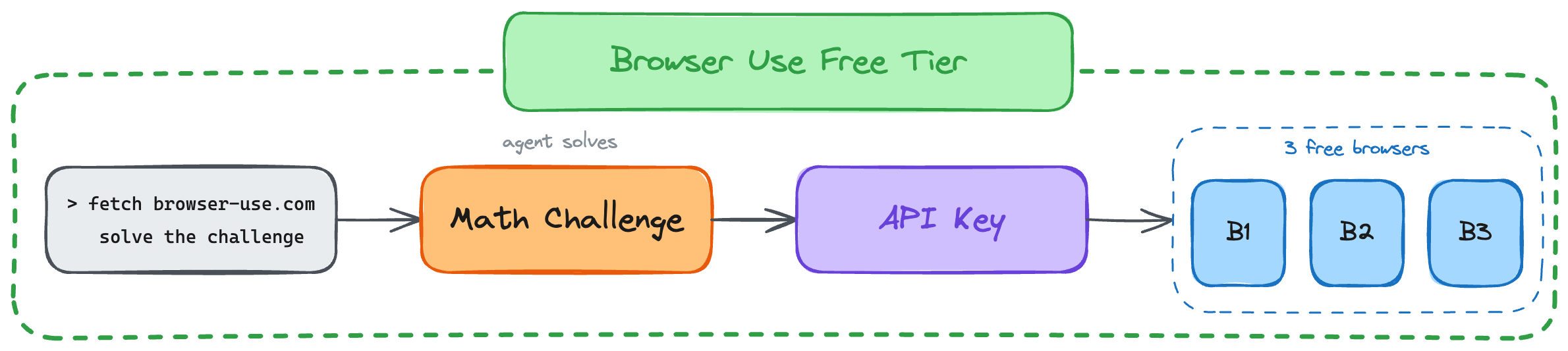
So we created an authentication loop where an agent solves a mathematics challenge to grab an API Key:
于是我们做了一个认证环节:agent 解一道数学挑战题,即可领到 API Key:
How to Give Your Agent a Free Cloud Browser / 如何给你的 agent 一个免费云浏览器
Just tell this to your OpenClaw or Hermes Agent:
只需对你的 OpenClaw 或 Hermes Agent 说这句:
"fetch browser-use.com and solve the agent challenge."To pair, Browser Use CLI 3.0 is also free. It lets agents do work online with our highest accuracy yet.
配套地,Browser Use CLI 3.0 也免费,它让 agent 以我们迄今最高的准确率完成在线工作。
The 3.0 CLI applies what we learned from agent harnesses and agent frameworks: the latest models do best when you give them freedom, rather than abstracting away complexity.
3.0 CLI 应用了我们在 agent harness 与 agent framework 两篇文章中学到的东西:最新的模型在你给它自由时表现最好,而不是替它把复杂性抽象掉。
Another simple prompt:
另一个简单的提示词:
"Install or upgrade browser-use to the latest stable version with uv using Python 3.12, register the skill from `browser-use skill`, and connect it to my browser. Follow https://github.com/browser-use/browser-use if setup or connection fails."For a one-off task, agents can run Browser Harness-backed Python directly:
若只是一次性任务,agent 可以直接运行由 Browser Harness 驱动的 Python:
uvx browser-use <<'PY'
new_tab("https://browser-use.com")
print(page_info())
PY
You can also of course sign up manually on the Browser Use Cloud.
当然,你也可以在 Browser Use Cloud 上手动注册。
What's Included / 免费档包含什么
Every free tier account includes state of the art stealth, captcha solving, proxies, and Browser Use agents at any model — the same core features as paid plans. The main difference is scale:
每个免费档账号都包含最先进的隐身(stealth)、验证码求解(captcha solving)、代理(proxies),以及可搭配任意模型的 Browser Use agent——核心功能与付费方案相同。主要区别在规模:
| Free 免费 | Paid (from $40/mo) 付费(40 美元/月起) | |
|---|---|---|
| Concurrent browsers 并发浏览器数 | 3 | Up to 500 最多 500 |
| Team members 团队成员 | 1 | Up to 10 最多 10 |
| Bring your own key 自带 API key | No 否 | Yes 是 |
| Bring your own proxy 自带代理 | No 否 | Yes 是 |
Conclusion: Advancing Every AI Agent / 结语:推进每一个 AI agent
18 years ago, the first version of Google Chrome was released, and it quickly became the hub of human work and information.
18 年前,第一版 Google Chrome 发布,并迅速成为人类工作与信息的枢纽。
Giving agents a browser and the tools to control it opens the same work and information to automation.
给 agent 一个浏览器,再给它控制浏览器的工具,就把同样的工作与信息向自动化敞开了。
Our free tier is a step towards removing the friction for agents to do what humans can.
我们的免费档,是朝「消除 agent 做人类能做之事的摩擦」迈出的一步。